

Callbacks in JavaScript: Why They Exist
Before Promises, before async/await — there were callbacks. Understanding them isn't just history; it's the foundation of everything async in JavaScript.
Before Promises, before
async/await— there were callbacks. Understanding them isn't just history; it's the foundation of everything async in JavaScript.
Table of Contents
1. Functions Are Values in JavaScript
Before we talk about callbacks, we need to talk about something that surprises a lot of beginners: in JavaScript, functions are just values — like strings or numbers. You can store them in variables, put them in arrays, and most importantly, pass them into other functions.
function greet() {
  console.log("Hello!");
}

// Store in a variable
const sayHi = greet;

// Pass as an argument to another function
function runIt(fn) {
  fn();  // call whatever was passed in
}

runIt(greet);  // prints "Hello!"
runIt(sayHi);  // also prints "Hello!"
Notice: when passing greet to runIt, we write it without the parentheses. greet is the function itself. greet() would call it immediately and pass the result instead.
💡 Key insight: A function with
()is an invocation — it runs now and gives back a value. Without(), it's a reference — a value you can carry around and call later.
2. What Is a Callback Function?
A callback is simply a function you pass into another function, to be called at some point during that function's execution. The name comes from the idea of "calling back" — you hand off a function and say: "when you're done, call this."
function processUser(name, callback) {
  const upper = name.toUpperCase();
  callback(upper);  // call the function we received
}

processUser("priya", function(result) {
  console.log("Processed: " + result);
});
// Output: Processed: PRIYA
Here, the anonymous function function(result) { ... } is the callback. We defined the behaviour outside of processUser, but it gets executed inside it.
Here's how the flow works visually:
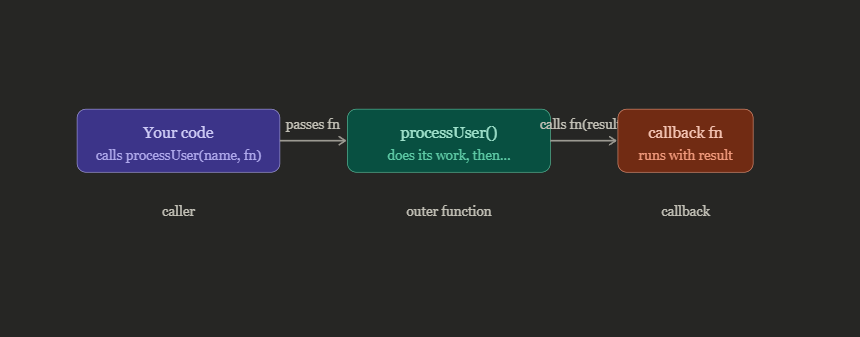
That separation of concerns is what makes callbacks so powerful. The outer function doesn't need to know what the callback does — it just knows to call it when ready.
3. Why Callbacks Exist — The Async Problem
Here is the real reason callbacks were invented. JavaScript runs on a single thread — it can only do one thing at a time. This creates a problem: what happens when you need to do something that takes time, like fetching data from a server, reading a file, or waiting for a timer?
If JavaScript just stopped and waited, your entire web page would freeze. Nobody wants that.
So instead, JS says: "I'll start that task and move on. When it finishes, I'll call this function you gave me." That function is the callback.
Without callbacks — this would freeze the browser:
// Imagine if fetch() just blocked...
const data = fetch("https://api.example.com/user");
// ... browser is frozen here for 2 seconds ...
console.log(data); // ok, now we have data
With a callback — non-blocking:
// Old-style XMLHttpRequest with a callback
loadUserData("user_42", function(data) {
  // This runs LATER, when data is ready
  console.log("Got user:", data.name);
});

// This runs IMMEDIATELY, without waiting
console.log("Request sent, moving on...");
The output order might surprise you the first time: "Request sent, moving on..." prints first, and then — after the data loads — "Got user: ..." prints. This is asynchronous execution, and callbacks are what make it possible.
🍽️ Think of it like a restaurant. You place your order (start the async task), give your number (the callback), then sit down and chat with friends (continue executing). When the food is ready, the waiter calls your number (invokes the callback). You don't stand at the counter blocking everyone.
setTimeout — the simplest async callback
console.log("1 - start");

setTimeout(function() {
  console.log("3 - this runs after 2 seconds");
}, 2000);

console.log("2 - end");

// Output:
// 1 - start
// 2 - end
// 3 - this runs after 2 seconds
setTimeout takes a callback and a delay in milliseconds. It doesn't block — it schedules the callback to run later and immediately moves on.
4. Callbacks in Common Scenarios
You use callbacks far more often than you might realize. Here are the three places you'll encounter them every single day.
Array methods — callbacks for transformation
forEach, map, filter, and reduce all take a callback function and call it for every element in the array:
const scores = [45, 82, 67, 91, 38];

// callback runs for each element
const passed = scores.filter(function(score) {
  return score >= 50;
});

// same thing with arrow function (ES6+)
const passed2 = scores.filter(score => score >= 50);

console.log(passed); // [82, 67, 91]
const names = ["alice", "bob", "charlie"];

const uppercased = names.map(name => name.toUpperCase());
// ["ALICE", "BOB", "CHARLIE"]
Event listeners — callbacks for user interaction
Every click handler, every input listener — that's a callback. You're telling the browser: "when this event happens, call this function."
const btn = document.querySelector("#submit");

btn.addEventListener("click", function(event) {
  // This only runs when the button is clicked
  console.log("Button clicked!", event.target);
});
The browser holds onto this function and fires it at the right moment. That's callbacks doing their job.
Node.js file reading — the error-first pattern
In Node.js, callbacks follow a specific convention: the first argument is always the error (or null if everything went fine). This is called the error-first callback pattern.
const fs = require("fs");

fs.readFile("data.json", "utf8", function(err, data) {
  if (err) {
    console.error("Oops:", err.message);
    return;
  }
  console.log("File contents:", data);
});
📌 Error-first is a convention, not a rule. The Node.js community standardised on
(err, data)ordering so that every async function looks consistent. Always checkerrbefore usingdata— iferrexists,datamight beundefined.
5. The Callback Hell Problem
Callbacks work well in isolation. The trouble starts when async operations depend on each other — when you need to do step 2 only after step 1 finishes, and step 3 only after step 2, and so on.
You end up nesting callbacks inside callbacks inside callbacks:
// The Pyramid of Doom
getUser("user_1", function(user) {
  getOrders(user.id, function(orders) {
    getOrderDetails(orders[0].id, function(details) {
      getShipping(details.shippingId, function(shipping) {
        // Finally... we have what we need
        console.log("Shipping to:", shipping.address);
      });
    });
  });
});
See how the code keeps shifting to the right? This is known as the Pyramid of Doom or Callback Hell.
Here's what the nesting looks like as a flow:
getUser()
  └──► getOrders()           (runs after user is fetched)
         └──► getOrderDetails()    (runs after orders are fetched)
                └──► getShipping()      (runs after details are fetched)
                       └──► finally use the data
It's not just ugly — it's genuinely hard to maintain:
Error handling becomes a nightmare — you need to check errors at every level separately.
Readability suffers — following the logic requires tracing deep indentation.
Debugging is painful — a bug at level 3 means tracing through all the outer layers.
Refactoring is risky — moving one piece often breaks the others.
⚠️ Signs you're in callback hell: Deep indentation that shifts right with each step, error checks copy-pasted at every level, code that's hard to read even a week after you wrote it, and nearly impossible to refactor without breaking something.
The good news? Callback hell is exactly why Promises were introduced in ES6, and why async/await came in ES2017. They are direct solutions to this pyramid problem. Understanding callbacks — and why they fall apart at scale — is what makes those newer patterns click into place.
Quick Recap
| Concept | What it means |
|---|---|
| Callback | A function passed as an argument to another function |
| Synchronous callback | Called immediately (e.g. array.map(fn)) |
| Asynchronous callback | Called later, when an async task completes |
| Error-first pattern | function(err, data) — always check err first |
| Callback hell | Deep nesting when async tasks depend on each other |
What's Next?
Callbacks are JavaScript's original answer to async programming. They're still everywhere — in event listeners, array methods, and Node.js — so you'll be reading and writing them for your entire career.
But as you've seen, they break down at scale. In the next article in this series, we'll look at Promises — how they flatten the pyramid and make async code readable again.
Next up → Promises in JavaScript: Solving Callback Hell with Chains
Found this useful? Drop a reaction and share it with someone learning JavaScript. Questions or corrections? Leave a comment — I read every one.
< Keep Coding />
