

Map and Set in JavaScript
JavaScript already had objects and arrays. So why did ES6 introduce Map and Set? Because objects and arrays have real limitations — and Map and Set were built to solve them specifically.
Table of Contents
1. What Is a Map?
A Map is a collection of key-value pairs — just like a plain object. The critical difference is what you can use as a key.
In a plain object, keys can only be strings or symbols. If you use anything else — a number, a function, another object — JavaScript silently converts it to a string first. That silent conversion is where bugs are born.
// Plain object — keys get silently converted to strings
const obj = {};
obj[1]         = "number key";
obj[true]      = "boolean key";
obj[{ id: 1 }] = "object key";

console.log(Object.keys(obj));
// ["1", "true", "[object Object]"]
// ↑ Every key got stringified — your actual values are gone
A Map doesn't do that. It remembers what you gave it — a number key stays a number, an object key stays that exact object reference. Keys in a Map are compared by strict equality (===), not by their string representation.
const map = new Map();

map.set(1, "number key");
map.set(true, "boolean key");
map.set({ id: 1 }, "object key");

console.log(map.size); // 3
// All three keys preserved exactly as given
Creating and using a Map
// Create empty and add entries
const userRoles = new Map();

userRoles.set("priya", "admin");
userRoles.set("arjun", "editor");
userRoles.set("meera", "viewer");

// Read a value
console.log(userRoles.get("priya")); // "admin"
console.log(userRoles.get("ravi"));  // undefined

// Check if a key exists
console.log(userRoles.has("arjun")); // true
console.log(userRoles.has("ravi"));  // false

// Remove an entry
userRoles.delete("meera");

// How many entries?
console.log(userRoles.size); // 2

// Clear everything
userRoles.clear();
Creating a Map from existing data
You can initialise a Map directly from an array of [key, value] pairs:
const prices = new Map([
  ["apple",  1.5],
  ["banana", 0.8],
  ["mango",  2.0]
]);

console.log(prices.get("mango")); // 2.0
This pattern is clean and commonly used when you have data from an API or a database that you want to work with efficiently.
Iterating over a Map
Map preserves the insertion order of its entries — something objects only guarantee for string keys in modern engines, and even then with caveats. With Map, the order is always exactly as you inserted.
const capitals = new Map([
  ["India",  "New Delhi"],
  ["France", "Paris"],
  ["Japan",  "Tokyo"]
]);

// Iterate over key-value pairs
for (const [country, capital] of capitals) {
  console.log(`\({country} → \){capital}`);
}
// India  → New Delhi
// France → Paris
// Japan  → Tokyo

// Just keys
for (const country of capitals.keys()) {
  console.log(country);
}

// Just values
for (const capital of capitals.values()) {
  console.log(capital);
}

// Convert to array of pairs
const entries = [...capitals.entries()];
// [["India", "New Delhi"], ["France", "Paris"], ["Japan", "Tokyo"]]
2. What Is a Set?
A Set is a collection of unique values. You can put anything into it — numbers, strings, objects — but it will never store the same value twice. If you try to add a duplicate, it's silently ignored.
This is the problem with plain arrays: they have no built-in concept of uniqueness. If you push the same value ten times, you get ten entries. Removing duplicates from an array the traditional way is clunky — filter with indexOf, or use a manual object as a lookup. Set makes uniqueness the default.
// Array — duplicates stack up with no warning
const arr = [1, 2, 2, 3, 3, 3];
console.log(arr.length); // 6 — all six entries exist

// Set — duplicates are silently ignored
const set = new Set([1, 2, 2, 3, 3, 3]);
console.log(set.size); // 3 — only unique values: {1, 2, 3}
Creating and using a Set
const tags = new Set();

tags.add("javascript");
tags.add("nodejs");
tags.add("webdev");
tags.add("javascript"); // duplicate — silently ignored

console.log(tags.size);               // 3
console.log(tags.has("nodejs"));      // true
console.log(tags.has("python"));      // false

tags.delete("webdev");
console.log(tags.size);              // 2
The most common use — removing duplicates from an array
This is a one-liner that every JavaScript developer should know:
const withDuplicates = [1, 2, 2, 3, 4, 4, 4, 5];

// Spread the Set back into an array
const unique = [...new Set(withDuplicates)];

console.log(unique); // [1, 2, 3, 4, 5]
What's happening: new Set(withDuplicates) creates a Set which drops duplicates. [...set] spreads it back into a plain array. Two steps, one line.
It works equally well with strings:
const words = ["apple", "banana", "apple", "cherry", "banana"];
const uniqueWords = [...new Set(words)];

console.log(uniqueWords); // ["apple", "banana", "cherry"]
Iterating over a Set
Set also preserves insertion order:
const permissions = new Set(["read", "write", "execute"]);

for (const permission of permissions) {
  console.log(permission);
}
// read
// write
// execute

// Convert to array when you need array methods
const permArray = [...permissions];
const upper = permArray.map(p => p.toUpperCase());
// ["READ", "WRITE", "EXECUTE"]
3. Map vs Object — The Real Differences
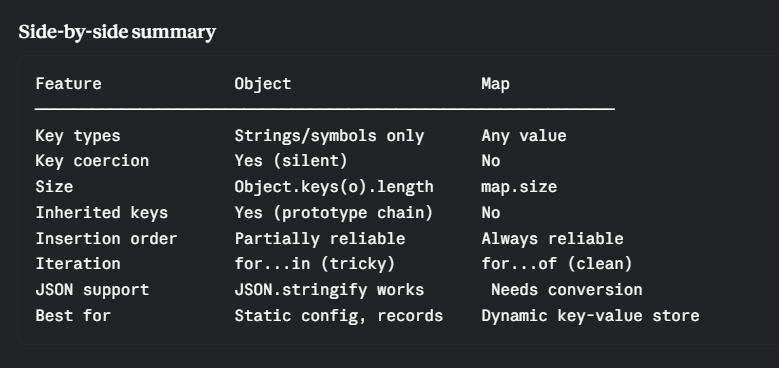
On the surface, a Map and a plain object both store key-value pairs. But they behave very differently in practice, and choosing the wrong one creates real problems.
Key types
// Object — only string/symbol keys (everything else gets coerced)
const obj = {};
obj[1]         = "value";
console.log(Object.keys(obj)); // ["1"] ← number became string

// Map — any value can be a key
const map = new Map();
const keyObj = { id: 42 };
const keyFn  = () => {};

map.set(keyObj, "object as key");
map.set(keyFn, "function as key");
map.set(1, "number as key");     // stays a number
map.set(NaN, "NaN as key");      // even NaN works

console.log(map.get(keyObj)); // "object as key"
console.log(map.get(1));      // "number as key"
Size
const obj = { a: 1, b: 2, c: 3 };
const map = new Map([["a", 1], ["b", 2], ["c", 3]]);

// Object — no built-in size, have to compute it
console.log(Object.keys(obj).length); // 3 — extra step

// Map — size is a built-in property
console.log(map.size); // 3 — direct
Inherited keys problem
This one is subtle but important. Plain objects inherit properties from Object.prototype. If you're using an object as a data store and checking whether a key exists, you can accidentally get a hit on an inherited property.
const obj = {};

// These keys don't exist on obj — but they come from Object.prototype
console.log("toString"    in obj); // true  ← false positive
console.log("constructor" in obj); // true  ← false positive
console.log("hasOwnProperty" in obj); // true  ← false positive

// Map starts completely empty — no inherited keys
const map = new Map();
console.log(map.has("toString"));    // false ✓
console.log(map.has("constructor")); // false ✓
If you use the in operator on objects to check for keys, you're vulnerable to this. Map doesn't have this problem.
Iteration order
// Object — ordering of integer keys can be surprising
const obj = {};
obj["b"] = 2;
obj["a"] = 1;
obj[2]   = "two";
obj[1]   = "one";

console.log(Object.keys(obj)); // ["1", "2", "b", "a"]
// Integer keys sort numerically first, then string keys in insertion order

// Map — always exactly insertion order, no exceptions
const map = new Map();
map.set("b", 2);
map.set("a", 1);
map.set(2, "two");
map.set(1, "one");

console.log([...map.keys()]); // ["b", "a", 2, 1]
// Exactly as inserted, regardless of key type
Side-by-side summary
4. Set vs Array — The Real Differences
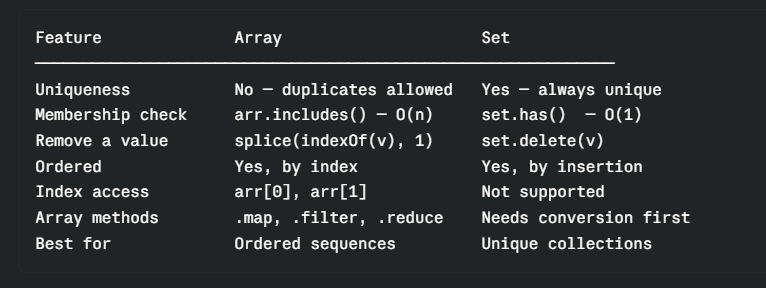
Arrays and Sets both hold collections of values, but they have fundamentally different strengths.
Uniqueness
// Array — no uniqueness, duplicates welcome
const arr = [1, 2, 3];
arr.push(2); // silently added
arr.push(3); // silently added
console.log(arr); // [1, 2, 3, 2, 3]

// Set — uniqueness is the rule, duplicates silently ignored
const set = new Set([1, 2, 3]);
set.add(2); // ignored
set.add(3); // ignored
console.log([...set]); // [1, 2, 3]
Checking membership
This is a big one for performance. Checking whether a value exists in an array requires scanning every element until a match is found — that's O(n) time. Set lookups are O(1) — constant time regardless of how large the Set is.
const arr = [1, 2, 3, 4, 5];
const set = new Set([1, 2, 3, 4, 5]);

// Array — scans from the beginning until it finds the value
arr.includes(5);   // has to check 1, 2, 3, 4, then finds 5
arr.indexOf(5);    // same scan

// Set — goes directly to the answer
set.has(5);        // O(1) — instant, no scanning
For small collections this doesn't matter. For thousands of values, or when you're checking membership frequently, the difference is significant.
Removing a value
const arr = [1, 2, 3, 4];

// Array — find the index first, then splice it out
const index = arr.indexOf(3);
if (index !== -1) arr.splice(index, 1);
console.log(arr); // [1, 2, 4]

// Set — just delete
const set = new Set([1, 2, 3, 4]);
set.delete(3);
console.log([...set]); // [1, 2, 4]
Side-by-side summary
5. When to Use Map and Set
Use Map when...
You need non-string keys. If your keys are numbers, objects, or anything other than strings, a plain object will corrupt them. Map is the only reliable choice.
// DOM node as a key — object can't do this reliably
const elementMetadata = new Map();
const button = document.querySelector("#submit");

elementMetadata.set(button, { clickCount: 0, lastClicked: null });
elementMetadata.get(button).clickCount++;
You're building a dynamic key-value store where keys are added and removed frequently. Map's delete, has, and size make this far cleaner than managing it on a plain object.
// Session store — users log in and out
const sessions = new Map();

sessions.set("token_abc123", { userId: 1, expires: Date.now() + 3600000 });
sessions.set("token_xyz456", { userId: 2, expires: Date.now() + 3600000 });

// User logs out
sessions.delete("token_abc123");
console.log(sessions.size); // 1
You need guaranteed insertion-order iteration. When the order matters and you have mixed key types, Map is the only choice that behaves predictably.
You want a clean key space. No risk of toString, constructor, or hasOwnProperty showing up as false positives.
Use Set when...
You need a collection of unique values. This is the primary use case. Tags, permissions, visited URLs, selected items in a UI — anything where duplicates are invalid by definition.
// Track which pages a user has visited
const visited = new Set();

visited.add("/home");
visited.add("/about");
visited.add("/home");   // already visited — ignored
visited.add("/contact");

console.log(visited.size);         // 3
console.log(visited.has("/about")); // true
You need fast membership checks on a large collection. If you have thousands of items and you're frequently asking "is this value in the collection?", replace the array with a Set.
// Blocked email addresses — checked on every signup
const blocklist = new Set(["spam@domain.com", "fake@domain.com" /* ... thousands more */]);

function isBlocked(email) {
  return blocklist.has(email); // O(1) — doesn't slow down with more entries
}
You need to remove duplicates. The [...new Set(arr)] pattern is the standard, efficient way to deduplicate any array.
You're computing set operations — union, intersection, or difference between two collections:
const setA = new Set([1, 2, 3, 4]);
const setB = new Set([3, 4, 5, 6]);

// Union — all values from both
const union = new Set([...setA, ...setB]);
console.log([...union]); // [1, 2, 3, 4, 5, 6]

// Intersection — values in both
const intersection = new Set([...setA].filter(v => setB.has(v)));
console.log([...intersection]); // [3, 4]

// Difference — values in A but not in B
const difference = new Set([...setA].filter(v => !setB.has(v)));
console.log([...difference]); // [1, 2]
Quick Recap
// ── MAP ────────────────────────────────────

const map = new Map();
map.set("key", "value");    // add
map.get("key");              // read → "value"
map.has("key");              // check → true
map.delete("key");           // remove
map.size;                    // count
map.clear();                 // remove all

// Any key type
map.set(42, "number key");
map.set({}, "object key");

// Iterate
for (const [key, value] of map) { }


// ── SET ─────────────────────────────────────

const set = new Set();
set.add("value");            // add (duplicate ignored)
set.has("value");            // check → true
set.delete("value");         // remove
set.size;                    // count
set.clear();                 // remove all

// Deduplication
const unique = [...new Set([1, 2, 2, 3, 3])]; // [1, 2, 3]

// Iterate
for (const value of set) { }


// ── CHOOSE BY SITUATION ──────────────────────────────────────

// Need key-value pairs with any key type? → Map
// Need ordered unique values?              → Set
// Removing duplicates from an array?       → Set
// Static config, JSON serialisation?       → Plain object
// Ordered list with duplicates allowed?    → Array
Map and Set are not replacements for objects and arrays — they're additions for specific situations where objects and arrays fall short. Once you know what problems they were designed to solve, you'll recognise those situations immediately: mixed key types, uniqueness requirements, fast membership checks, clean dynamic stores. The right tool becomes obvious.
Next up → Promises in JavaScript: Solving Callback Hell with Chains.
Found this useful? Drop a reaction and share it with someone learning ES6. Got a question? Leave a comment — I read every one.
