

The Node.js Event Loop Explained
Node.js handles thousands of simultaneous connections on a single thread without freezing. That sounds impossible — until you understand the event loop.
Table of Contents
1. What the Event Loop Is
The event loop is the mechanism that allows Node.js to perform non-blocking operations — reading files, querying databases, making HTTP requests — despite running on a single thread. It is the heartbeat of every Node.js application, running continuously, checking whether there is work to do and delegating it in the right order.
A simple definition: the event loop is a loop that keeps running as long as there is pending work, and in each iteration it checks — "is the call stack empty? If yes, is there anything waiting in the queue? If yes, move it to the stack and run it."
That's it at its core. The rest is understanding what "the stack" and "the queue" actually mean, and how async operations fit into this picture.
2. Why Node.js Needs an Event Loop
To understand why the event loop exists, you have to start with the constraint that makes it necessary: JavaScript is single-threaded.
A thread is like a worker who can only do one thing at a time. JavaScript — and therefore Node.js — runs on a single thread. One worker. One thing at a time.
Most languages solve the concurrency problem by creating more threads. Need to handle a database query while also serving another HTTP request? Spawn a new thread for each one. Java, Python, Ruby — they all do some version of this by default.
This works, but it comes at a cost. Every thread consumes memory. Managing many threads creates complexity around shared state and synchronisation. Under heavy load, the thread overhead itself becomes a bottleneck.
Node.js made a different bet. Instead of many threads, use one thread and never let it sit blocked waiting. When you need to do something slow — read a file, query a database, make a network call — hand it off to the system, register a callback for when it's done, and immediately go back to handling other work. When the slow thing finishes, its callback gets queued. The event loop picks it up when the thread is free.
This model is called asynchronous non-blocking I/O, and it is the entire reason Node.js can handle tens of thousands of concurrent connections on a single core without breaking a sweat.
3. The Call Stack and Task Queue
Two data structures power the event loop. You need to understand both before the event loop's behaviour makes sense.
The Call Stack
The call stack is where JavaScript tracks which function is currently running and which function called it. It works exactly like a stack of plates — last in, first out.
When you call a function, it gets pushed onto the top of the stack. When it returns, it gets popped off. The JavaScript engine always executes whatever is at the top of the stack.
function greet(name) {
  return `Hello, ${name}`;
}

function main() {
  const message = greet("Priya");
  console.log(message);
}

main();
The call stack sequence for this:
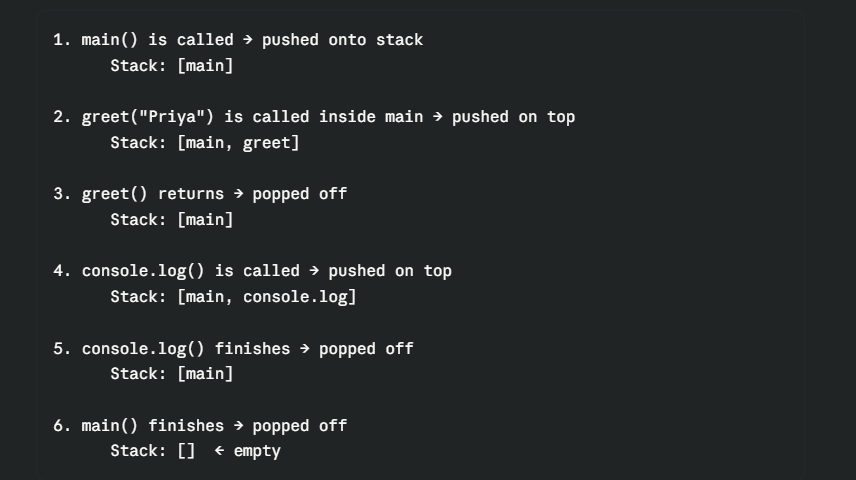
The critical rule: JavaScript can only execute one function at a time — the one at the top of the stack. If the stack is never empty, nothing else can ever run.
This is exactly the problem that async operations would cause if they were blocking. A database query that takes 500ms would sit on top of the stack for half a second, freezing everything.
The Task Queue (Callback Queue)
The task queue is a waiting room for callbacks whose async work has finished. It works like a regular queue — first in, first out.
When you ask Node.js to read a file, it hands the operation off to the underlying system and registers your callback. When the file is done being read, your callback doesn't run immediately — it gets placed in the task queue and waits its turn.

How the event loop connects them
The event loop has one job: watch the call stack and the task queue and act as the bridge between them.
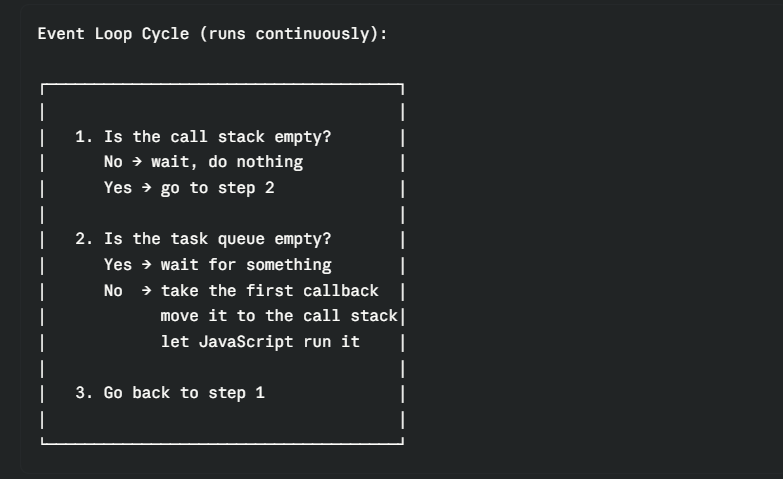
The event loop never pushes a callback to the stack while the stack still has work. It waits for the stack to clear, then moves the next queued callback in. This is how JavaScript stays single-threaded while still handling async work — it's perfectly sequential at the execution level, just cleverly interleaved.
4. How Async Operations Are Handled
Let's trace exactly what happens when Node.js encounters an async operation. This is the sequence that runs every time you use fs.readFile, fetch, setTimeout, or any other non-blocking call.
console.log("1 - start");

fs.readFile("data.txt", "utf8", function(err, data) {
  console.log("3 - file read complete");
});

console.log("2 - end");
Output:
1 - start
2 - end
3 - file read complete
Here is what actually happens, step by step:
Step 1: console.log("1 - start") is pushed to the stack, runs, and is popped off.
Step 2: fs.readFile(...) is pushed to the stack. Node.js sees this is an I/O operation. It hands the file read request off to the operating system (via a thread pool managed by libuv — Node's internal C library). The callback is registered but not queued yet. fs.readFile returns immediately and is popped off the stack.
Step 3: console.log("2 - end") is pushed, runs, and is popped off. The stack is now empty.
Step 4: Meanwhile, the OS finishes reading the file. It signals Node.js. libuv takes the callback you registered and places it in the task queue.
Step 5: The event loop checks: stack empty? Yes. Queue empty? No. It moves the callback to the stack.
Step 6: The callback runs. console.log("3 - file read complete") executes.
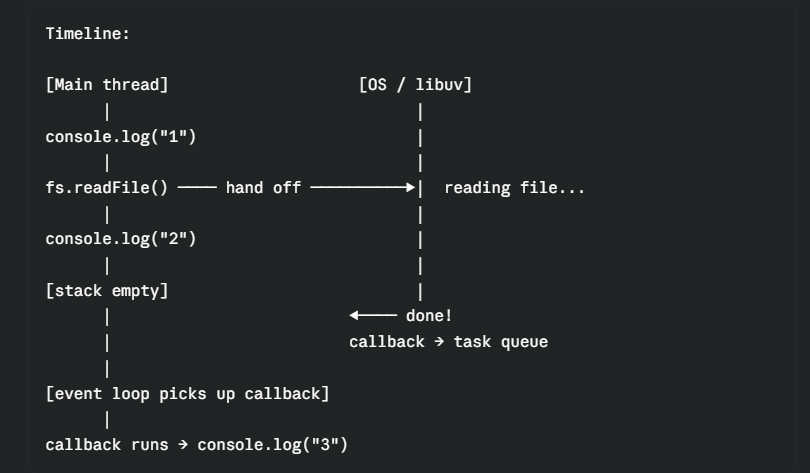
The thread never waited. It kept running "2" while the OS handled the file read. That's the entire mechanism.
5. Timers vs I/O Callbacks
Not all async callbacks are equal. Node.js processes different types of callbacks in a specific priority order. You don't need to know every internal phase in detail, but understanding the broad categories helps you reason about execution order.
Timers
setTimeout and setInterval register callbacks to run after a minimum delay. The word "minimum" is important — setTimeout(fn, 100) doesn't mean "run exactly at 100ms". It means "run no sooner than 100ms, whenever the event loop gets to timers and the threshold has been reached."
console.log("start");

setTimeout(function() {
  console.log("timer — 0ms minimum delay");
}, 0);

console.log("end");

// Output:
// start
// end
// timer — 0ms minimum delay
Even setTimeout(fn, 0) doesn't run the callback immediately. It queues it for the next event loop iteration, after the current synchronous code finishes. The call stack has to be clear first.
setTimeout(function() { console.log("timer 1"); }, 100);
setTimeout(function() { console.log("timer 2"); }, 50);
setTimeout(function() { console.log("timer 3"); }, 200);

// Output (in order of their delay):
// timer 2  (50ms)
// timer 1  (100ms)
// timer 3  (200ms)
I/O Callbacks
File reads, network responses, database query results — these are I/O callbacks. They run after their async operation completes, regardless of how long it took. Their ordering relative to each other depends on which operation finishes first.
const fs = require("fs");

fs.readFile("small.txt", "utf8", function(err, data) {
  console.log("small file read");
});

fs.readFile("large.txt", "utf8", function(err, data) {
  console.log("large file read");
});

// Output depends on which file the OS finishes first:
// small file read
// large file read
// (or reversed if the OS surprises you — arrival order determines queue order)
The key ordering rule
Synchronous code always runs before any async callback — no exceptions. The event loop won't touch the task queue until the call stack is completely clear.
setTimeout(function() {
  console.log("async — setTimeout");
}, 0);

console.log("sync — line 1");
console.log("sync — line 2");
console.log("sync — line 3");

// Output:
// sync — line 1
// sync — line 2
// sync — line 3
// async — setTimeout
No matter how long your synchronous code takes, async callbacks wait. This also means that if your synchronous code runs for a long time — a heavy loop, a large computation — it blocks the event loop for that entire duration. Nothing async can run until the stack clears. This is what's meant by "blocking the event loop" — and it's the cardinal sin in Node.js development.
Promises and microtasks
When you use Promises — .then(), .catch(), async/await — their callbacks go into a special queue called the microtask queue. Microtasks have higher priority than the regular task queue. Every time the call stack empties, Node.js drains the entire microtask queue before checking the regular task queue.
setTimeout(function() {
  console.log("4 — setTimeout (task queue)");
}, 0);

Promise.resolve().then(function() {
  console.log("2 — Promise.then (microtask queue)");
}).then(function() {
  console.log("3 — chained Promise (microtask queue)");
});

console.log("1 — synchronous");

// Output:
// 1 — synchronous
// 2 — Promise.then (microtask queue)
// 3 — chained Promise (microtask queue)
// 4 — setTimeout (task queue)
The order is: synchronous first → microtasks (Promises) → regular tasks (timers, I/O).
This explains a common confusion: why does a Promise.resolve().then() run before setTimeout(fn, 0) even though both are "async"? Because they're in different queues, and microtasks always flush first.
6. The Event Loop and Scalability
The event loop is the architectural reason Node.js became popular for web servers and APIs. To see why, compare two approaches to handling HTTP requests.
The thread-per-request model (traditional)
A traditional server like Apache — or a Java servlet container — creates one thread per incoming request. If 1,000 requests arrive simultaneously, it spawns up to 1,000 threads. Each thread sits in memory consuming roughly 1–2MB, even while it's just waiting for a database to respond.
Traditional server — 1,000 concurrent requests:

Request 1 → Thread 1 → waiting for DB... (1-2MB memory, idle)
Request 2 → Thread 2 → waiting for DB... (1-2MB memory, idle)
Request 3 → Thread 3 → waiting for DB... (1-2MB memory, idle)
...
Request 1000 → Thread 1000 → waiting... (1-2MB memory, idle)

Total: ~1-2GB memory, mostly doing nothing
Under high load, the server runs out of threads or memory. New requests queue up and wait. Response times climb. The server eventually buckles.
The event loop model (Node.js)
Node.js uses one thread. When 1,000 requests arrive, it registers the async work for all of them — database queries, file reads, external API calls — and immediately continues. The one thread is never sitting idle waiting for any of them. As each operation completes, its callback arrives in the task queue and gets processed in turn.
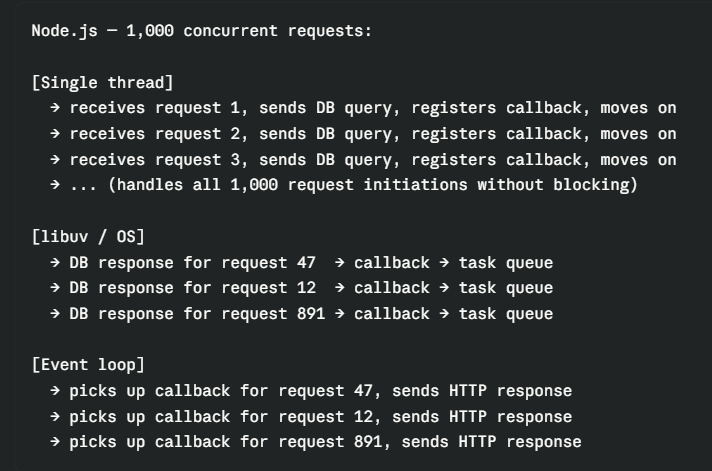
The single thread is never waiting — it's always doing something useful. The result: Node.js can comfortably handle 10,000+ concurrent connections on a single core with a fraction of the memory a thread-based server would need.
The limitation — CPU-bound work
The event loop model has one critical weakness: CPU-intensive work blocks everything.
The event loop works because I/O operations — waiting for files, databases, network responses — are handled by the OS and libuv outside the main thread. The JavaScript thread doesn't actually wait; it just gets notified when the work is done.
But if you're doing heavy computation — image processing, video encoding, cryptography, parsing enormous data sets — that work happens on the main thread. It sits on the call stack, and as long as it's running, the event loop can't process anything else. Every other request freezes while the computation runs.
// This blocks the entire event loop for ~2 seconds
// Every other request waits during this time
app.get("/compute", function(req, res) {
  let result = 0;
  for (let i = 0; i < 5_000_000_000; i++) {
    result += i;
  }
  res.json({ result });
});
Solutions for CPU-bound work in Node.js include worker threads (worker_threads module, which gives you actual separate threads for computation), child processes, or offloading the work to a dedicated service.
Node.js is exceptional for I/O-bound work — the kind of work that dominates most web applications: handling HTTP requests, reading from databases, calling external APIs, streaming files. It's not the right tool for CPU-bound tasks unless you explicitly manage that work off the main thread.
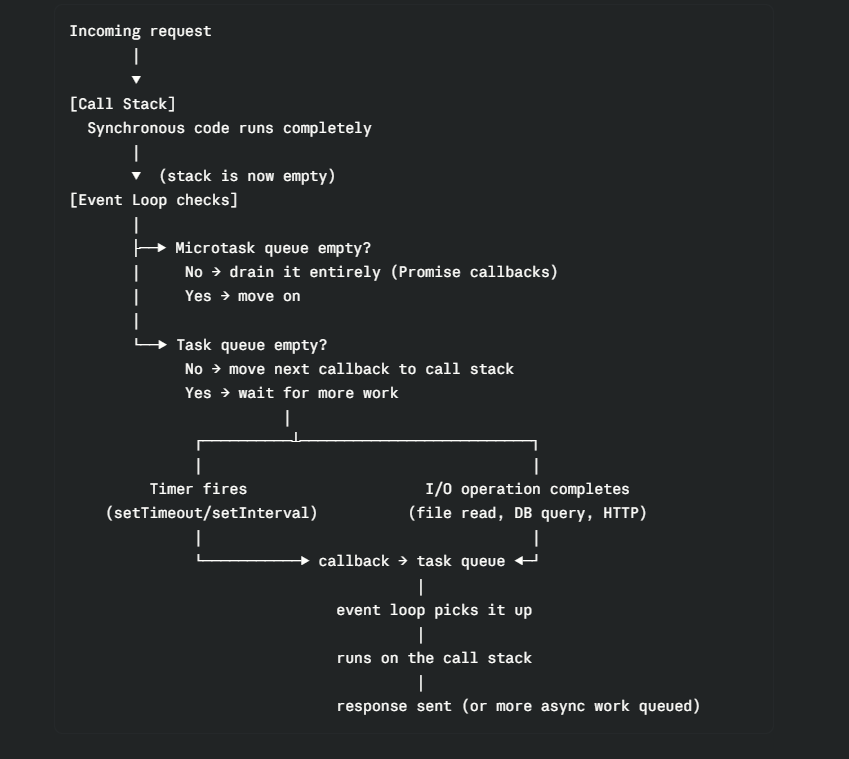
The Full Picture in One Flow
Quick Recap
| Concept | What to remember |
|---|---|
| Single thread | Node.js runs JavaScript on one thread — always |
| Call stack | Where functions run — one at a time, last in first out |
| Task queue | Where async callbacks wait after their operation completes |
| Event loop | Watches both — moves callbacks to the stack when it's clear |
| Non-blocking I/O | Async work is handed to the OS — the thread never waits |
| Microtask queue | Promise callbacks — higher priority than regular task queue |
| Execution order | Synchronous → microtasks (Promises) → tasks (timers, I/O) |
| Blocking the loop | Heavy synchronous computation freezes all other requests |
| Scalability | One thread + event loop handles far more than threads-per-request |
The event loop is why Node.js can be both single-threaded and highly concurrent — two things that seem contradictory until you understand that most web server work is waiting, not computing. The event loop converts that waiting time into useful work for other requests. That's the insight. Everything else is implementation detail.
Next up → Understanding Streams in Node.js: Why They Exist and When to Use Them.
Found this useful? Drop a reaction and share it with someone building their first Node.js server. Got a question? Leave a comment — I read every one.
